
Course sites are empty and inactive by default, which prevents students from accessing unused courses. To ensure a course site is active and available for the start of the semester, instructors must make courses “Active” for students to access the course in Brightspace. The default start and end dates are based on the academic calendar; no start or end date input is required.
Category: Educational Technology & Design
Importing Content
Each semester, a course space is created for every course offering listed in the timetable. Course sites are empty and inactive by default, allowing flexibility in case they will not be used. Instructors can import content from a previous course offering, provided they have access to the previous course site. While student data is excluded from the import process, all course materials, including resources, gradebook, and assessments, are included.
Importing Content [PDF]
Adding Users to a Course in Brightspace
Students are added to courses automatically in Brightspace, based on their course registrations. While Instructors do not have to worry about adding students to their courses, they will need to add other instructors, lab instructors and/or teaching assistants to their courses. It’s always best to search for users by either their NetID or B00#.
Adding/Editing Restrictions Dates, and Manage Dates
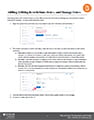 Associating dates with content release is a very effective tool for instructors to manage pace and minimize content overload for students. Release Conditions for a module are grouped with date restrictions, but they can also be applied to assessment items such as quizzes, assignments, and surveys. The advantage of adding a release conditions is that they allow students to access specific materials based on criteria that is not related to date. The manage dates tool gives instructors the ability to efficiently bulk edit and offset the date restrictions of each aspect of their course, such as discussion topics, assessments, announcements, and modules. This tool also gives instructors the option to edit the start and end dates of the course. This is very useful for instructors who wish to give students early or prolonged access to the course materials before the course has started or after the course has finished.
Finding Your Brightspace Course
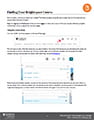
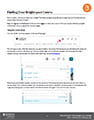 Each semester, new course spaces are created. The following steps will guide you through how to find these courses, and pin them for ease of access.
Educational Technology and Design – Getting Help/Support
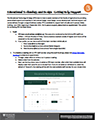 The Educational Technology & Design (ETD) team is here to assist members of the Faculty of Agriculture by providing personalized support and expertise in instructional design, visual design, course development, technical support, and course delivery through a range of delivery modes. ETD is available for support virtually (preferred) and as of September 2021, for in-person support in Room 236, Haley Institute. To book an appointment, visit https://bit.ly/etd-bookings or view the PDF linked below for more information.
Educational Technology and Design – Getting Help/Support [PDF]
Adding Ouriginal to your Brightspace Course
 Ouriginal (formerly known as Urkund) is Dalhousie University’s approved plagiarism detection service and is available via Brightspace. The instructions below explains how you add the Ouriginal integration to your Brightspace course and how to turn on the Ouriginal submission within assignment folders.
Brightspace Rubric Tool
 Rubrics are a useful tool instructors can use to define their expectations for students and can be used in providing feedback. The Brightspace Rubrics tool makes it easy for instructors to integrate rubrics into their online or blended courses. The following instructions will cover creating new rubrics and adding rubrics to an assignment or a discussion in Brightspace. A document on viewing rubrics for students has also been included. It is recommended that instructors intending to use rubrics circulate this document to their students.
Brightspace Rubric Tool [PDF]
Viewing Rubrics for Students [PDF]
Template Changes for Fall 2021
Educational Technology & Design’s Brightspace templates, as defined in a previous blog post, are “visual and structural design guidelines that can help instructors organize courses and create consistency for students”. The templates were heavily used in the 2020-2021 academic year and appeared to have achieved the intended goals. To affirm this achievement and to inform our template revision process, ETD was keen to speak with students directly to hear what they had to say.
The Faculty of Agriculture’s Winter 2021 templates were modified based on results from a (Faculty of Agriculture) student survey conducted in Fall 2020. The survey provided valuable feedback, but by engaging students in user testing, ETD would be able to obtain real-time feedback with the opportunity for both sides to ask questions. With the Assistant Dean, Students’ (Nancy McLean) assistance, an email was sent to students asking for participants. Three students were randomly selected from the respondents and in early July 2021, ETD ran three separate tests with students sharing their screens via Microsoft Teams as they navigated through a test course site in Brightspace.
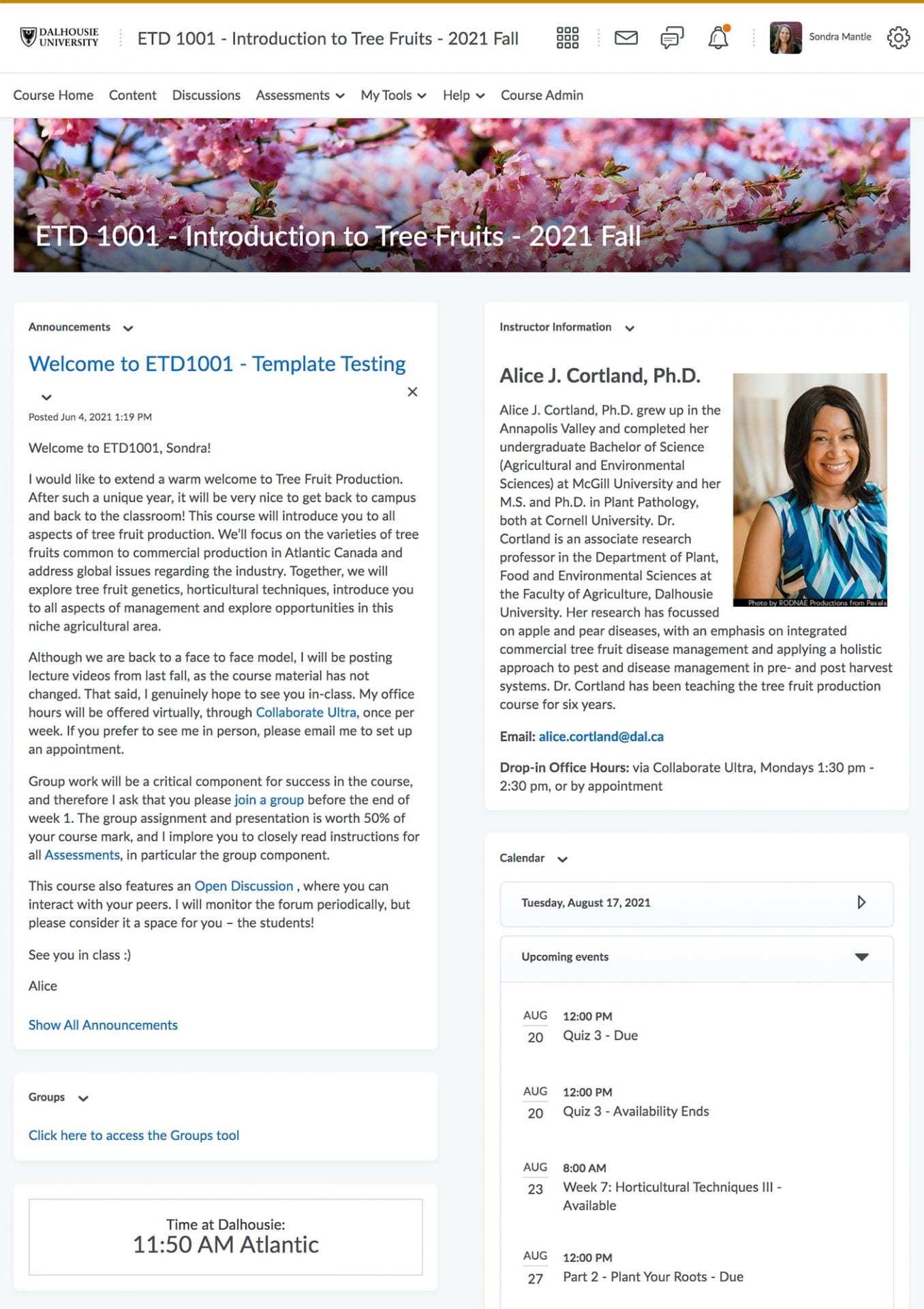
The test course site (shown above) was a fictional but realistic blended-format Faculty of Agriculture course, and the scenario was Day 1 of classes. The students were asked to explore the course homepage, the course centre, and module 1 within the course, all while being encouraged to think out loud, sharing what they saw and how they felt.
Key takeaways from the user testing:
- All three students read the Announcement on the homepage and stated its importance; preferred a shorter announcement with visual cues (bullets, bold text) over a “wall of text”.
- All three students appreciated a welcoming and short instructor bio with photo and detailed contact information on the homepage.
- After leaving the homepage, all three students looked for the Syllabus to either print or download.
- All three students appreciated the concise and consistent course navigation (shown below).

The key takeaways greatly confirmed our best practice recommendations and ETD will continue to encourage a thoughtful and welcoming, detailed but not wordy homepage, an easy to find Syllabus, and an organized and consistent layout.
The design template is something to which we have a degree of control in Brightspace, and it was important to obtain feedback in this area. Template feedback was not unanimous, but the students agreed that visual interest, consistency, and introductory text was all helpful.
Specific to the template, ETD made the following changes:
- Changing the “Course Centre” to “Syllabus and Course Centre”, to clearly communicate where the syllabus could be found.
- De-emphasize the Student Help Resources module, to include it in the “Syllabus and Course Centre” module but to designate the content links as “not required”.
- Streamline the colour progression in the submodule description areas, to minimize visual surprises.
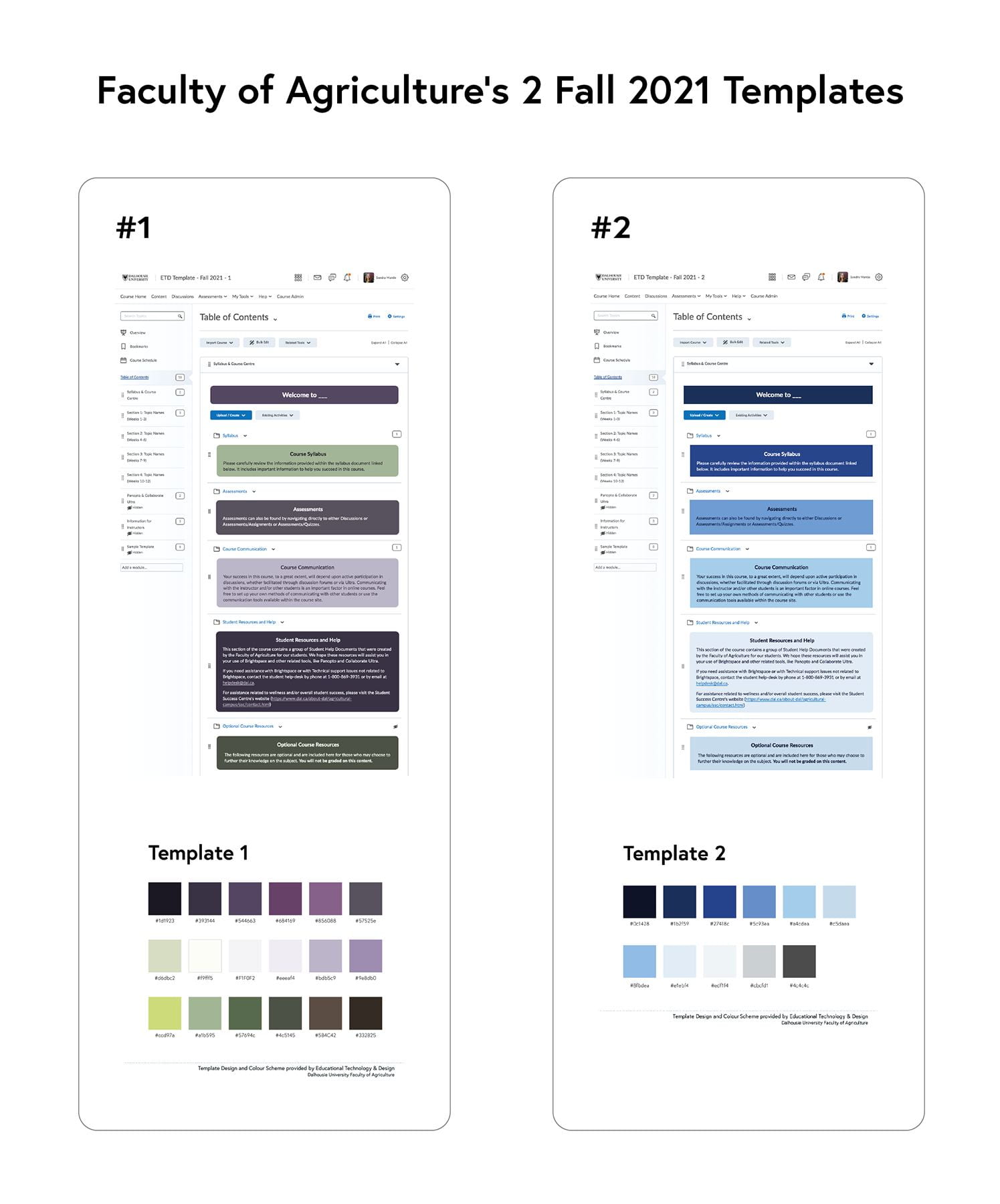
This was an exciting project this summer for ETD, and the student feedback greatly helped to affirm our best practice recommendations and informed our decisions on the template modifications to focus on for Fall 2021.
Brightspace Gradebook Setup
 The Brightspace Gradebook is a tool that stores and organizes student grades and calculates final marks based on the marking scheme established by instructors. Setting up a well-organized and balanced gradebook before the semester begins is essential and allows for ease of editing throughout the semester if adjustments are required.
Gradebook Setup [PDF]