
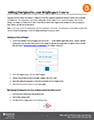
 Ouriginal (formerly known as Urkund) is Dalhousie University’s approved plagiarism detection service and is available via Brightspace. The instructions below explains how you add the Ouriginal integration to your Brightspace course and how to turn on the Ouriginal submission within assignment folders.
Tag: Widgets
Posts related to the Widgets available on a Brightspace Course Homepage
The Announcements Tool and Widget
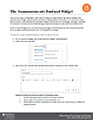 When you first log in to Brightspace, one of the first things you might notice on the main homepage is the Announcements widget. Announcements periodically releases pertinent information to all users of the system. Each course also comes with the Announcements widget built into the course homepage. Although it is possible for instructors to remove, we recommend leaving it in place for its value as a class-wide communication tool.
Similar to how all widgets work, the Announcements widget is a direct window into the Announcements Tool. When you add a new Announcements item, it is displayed in the widget.
Editing Homepages on Brightspace
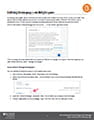 Brightspace homepages are a great way for instructors to communicate with students and keep online courses up to date. They can be used to display class announcements, reminders of upcoming due dates, instructor information, course policies and more.
Making the Groups Tool Accessible
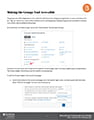 The groups tool within Brightspace is very useful for both discussions and group assignments. It is also commonly used as a ‘sign-up’ sheet or as a way to allow students to form working groups. Making the group tool accessible to students is as critical a step as setting up the groups.
Brightspace Quick Tips: Bookmark Feature
Use the Bookmark feature for ease of returning to a specific page in the course.
If you want to easily return to a particular area of a course, selecting the bookmark icon that is available throughout the environment will add a link in the “Bookmarks” in the Content page. The Bookmark feature is available to students as well; however, bookmarked items are private for each user.
You can add a bookmark widget to your homepage as well.